

VCS® Tools

What is OnlineLab VCS®?

OnlineLab VCS® is the Voice Clinical Systems® App that enables voice sample collection for biomechanical voice analysis. An innovative and precise App that allows you to:

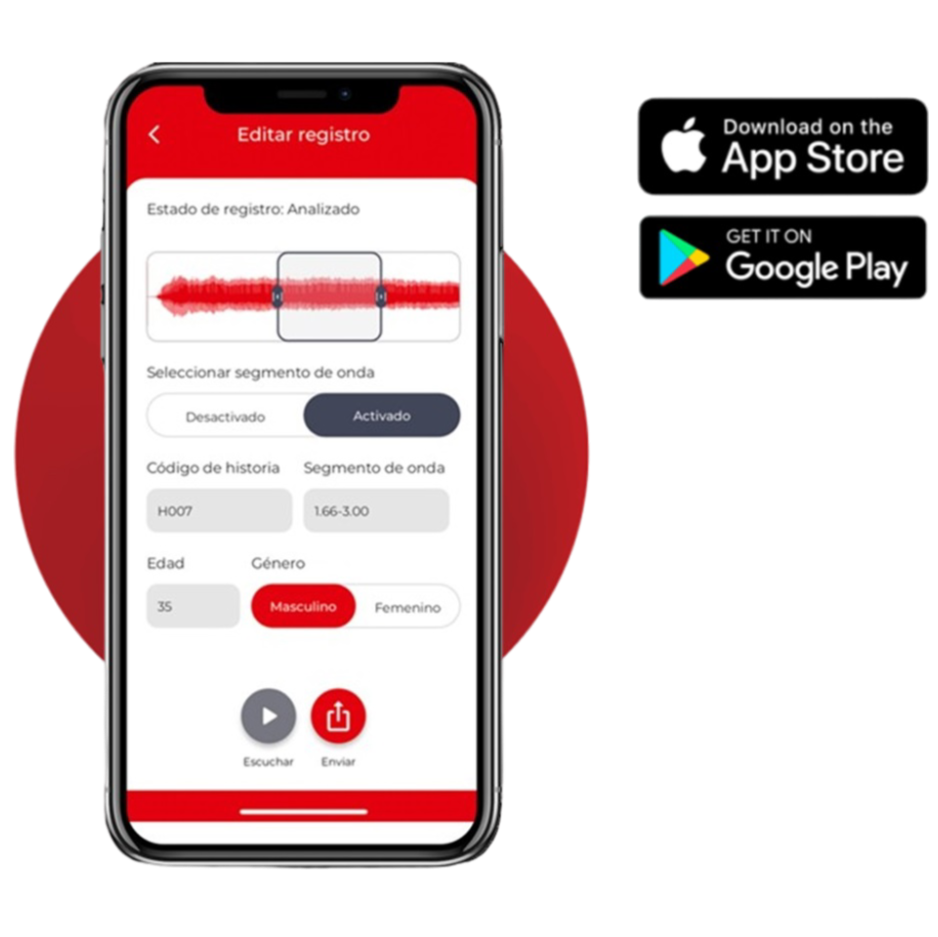
  • Validate your device before recording. Capture samples without an external microphone
  • Select the segment to analyse and repeat the analysis whenever needed
  • Request different types of reports
  • For patients: self-screening, find a specialist and connect remotely
  • For professionals: remote follow-up, get accredited and appear in the panel

Getting started

Before you begin…

2

The subscription

  • If you belong to an Institution, your centre will include you in the licence
  • If you are a patient, purchase an individual licence or have your specialist provide one

1

Registration

Quick and easy: it only takes a few minutes.

  • Complete the registration form
  • Choose your profile: Professional, Institution or Patient

3

The App and Panel

  • Download the App from the App Store or Google Play (free)
  • Log in with your username and password
  • Validate your device within the App
  • Pro-Individual and Pro-Teams users access the User Panel

Recording protocol

When recording voice samples…

Always follow the established recording protocol for voice sample collection in biomechanical analysis.

  • The study is based on a sustained /a/ vowel up to 4 seconds. Speech segments or other vowels are not accepted.
  • Monitor the distance of the device from your mouth and control the signal amplitude.
  • Always record in a quiet environment. Avoid contaminating the signal with other sounds.
  • Make sure the phonation matches the type of voice you wish to analyse.

Key recommendations

What you must not forget…

  • The analysis is based on modelling the free-edge dynamics of the vocal folds during phonation.
  • The modelling differs according to sex and age. Enter these values correctly before submitting the sample.
  • Assign a record number to your sample. Never include names, surnames or identifying patient data.
  • If you make a mistake, the App allows you to modify the values and request a new analysis.

Professional management

The VCS® User Panel

The Pro-INDIVIDUAL and Pro-TEAMS licences include access to a web panel for managing all information related to the patient’s voice.

Log in from the web (not from the App) using the same username and password you use in the App.

Pro-TEAMS: the administrator can easily add or remove professionals from their licence using the search tool. The professional simply needs to be previously registered — with or without a licence — in Voice Clinical Systems®.

If you are a professional registered in Voice Clinical Systems® without a licence and belong to an institution, contact the centre’s Administrator to be added to the subscription.

University students simply need to register as users with a PROFESSIONAL profile and contact their supervisor to be added to the licence.

User panel

All its features…

📋
Sample and report management

Voice samples and biomechanical analysis reports.

🖼️
Examination images

Attach images of the vocal folds.

📄
Personalised reports

Add your signature and institution details.

🎬
Examination video

Link patient information to an examination video.

📡
Remote samples

Receive voice samples remotely from your patients.

🔍
Vocal self-screening

Receive your patient’s vocal self-screening results.

👥
Work groups

Create groups and share information on Pro-TEAMS.

And much more…

Access the panel to discover all the features.

Vocal telemedicine

Remote follow-up of your patients…

OnlineLab allows you to develop true telemedicine by analysing your patients’ voice reliably and accurately.

To use this feature the following is required:

  • The patient must have a «Voz-SALUD» subscription. They can purchase it or be invited by the professional.
  • The professional must provide the patient with their VCS® identification code.

Institutions and centres that already trust Voice Clinical Systems®